What Is a Scooter LCD Display and How Does It Work? A Complete Overview
Scooter LCD displays have become an essential component of modern electric scooters, serving as the primary interface between rider and machine. As a manufacturer of electric scooter components, we understand the importance of reliable, high-quality LCD displays in delivering an exceptional user experience. This guide provides a comprehensive overview of scooter LCD displays, covering their features, technical specifications, types, and selection considerations.
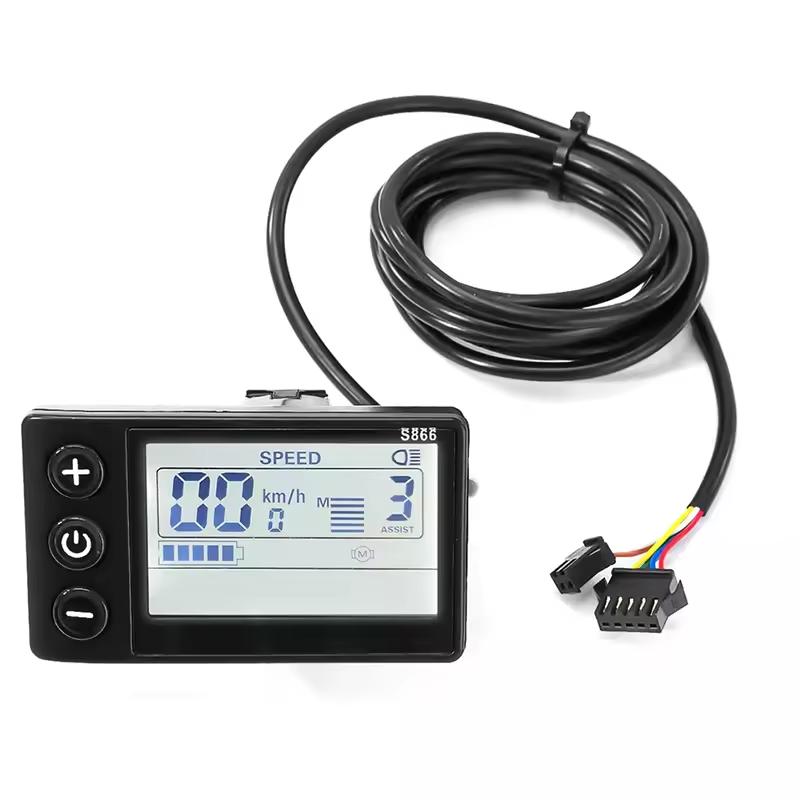
What Is a Scooter LCD Display?
A scooter LCD display is a digital dashboard mounted on the handlebars that provides real-time information about the scooter's performance and status. Unlike basic LED indicators that show only battery level, LCD displays offer a comprehensive view of multiple ride metrics in one glance. They have become standard features on most mid-range and premium electric scooters, from commuter models to high-performance variants.
Key Information Displayed
A typical scooter LCD display shows the following essential information:
-
Speed: Current speed displayed in either kilometers per hour or miles per hour. Many displays also show average and maximum speed.
-
Battery Status: Real-time battery level indicator, often shown as a bar graph or percentage. Some displays also show estimated remaining range.
-
Odometer and Trip Meter: Total distance traveled and distance for the current trip.
-
Riding Mode: Current riding mode, such as Economy, Normal, Sport, or Turbo.
-
Power Output: Real-time power usage or wattage.
Additional features found on more advanced models include cruise control indicators, headlight status, and fault diagnosis alerts.
Types of Scooter LCD Displays
Scooter LCD displays come in several configurations based on screen size, display type, and functionality.
Standard LCD Displays are the most common type, offering a monochrome or simple color display with basic ride information. They are typically found on entry-level and mid-range scooters. Standard LCD displays are known for their excellent visibility in bright sunlight and low power consumption.
Color LCD Displays are found on premium scooters, featuring larger color displays that provide enhanced readability and a more polished look. Color displays can also be customized to show different information layouts based on rider preference.
Aftermarket Replacement Displays are available for many scooter models for DIY repairs or upgrades. These are typically model-specific, designed for seamless integration with particular scooter brands and models.
Technical Features and Specifications
When selecting a scooter LCD display, consider the following technical aspects:
Display Quality. High-contrast, backlit screens with anti-glare properties ensure readability under all lighting conditions, including bright sunlight and dim environments. Higher-resolution screens provide sharper text and graphics for easier reading at a glance.
Build Quality. Premium ABS plastic construction is standard for scooter displays, offering impact resistance and durability for daily use. Look for displays with IP65 or similar weatherproof ratings to protect against rain, dust, and UV exposure. This is crucial for outdoor riding conditions.
Connectivity. Displays are typically compatible with 24V, 36V, 48V, or 60V systems, depending on the scooter's power configuration. Most displays connect to the scooter controller via a 5-pin or 6-pin connector. Pin configurations and communication protocols vary, so ensure compatibility with your specific controller.
Additional Functionality. Some displays include a USB port for charging phones or other devices while riding. Certain displays offer Bluetooth for connecting to smartphone apps, enabling more detailed data analysis and customization.
Installation Considerations
Installing or replacing a scooter LCD display is generally straightforward but requires attention to detail.
Displays are often brand- and model-specific. Ensure the display matches your scooter model or uses a universal communication protocol. Some displays require the scooter controller to support specific communication protocols to function correctly. Basic tools such as screwdrivers and Allen keys are typically sufficient. Many displays come with necessary mounting hardware. For safety, disconnect the scooter battery before installing any electrical components.
Market Trends
Scooter LCD displays continue to evolve alongside the scooter market itself. Key trends include larger and more vibrant color displays, increasing integration with smartphone connectivity and Bluetooth, more sophisticated data presentation including fault diagnosis and maintenance alerts, customizable interfaces allowing riders to select preferred data layouts, and enhanced durability with improved weatherproofing and build quality.
Maintenance Tips
To ensure the longevity of your scooter LCD display, keep the screen clean with a soft, dry cloth, avoid using harsh chemicals or abrasive materials, protect the display from impacts and extreme temperature exposure, and check the cable and connector for wear periodically.